
Autonomous AI Growth
Engineered for Massive X Engagement
The high-performance engagement assistant for creators, growth hackers, and agency builders on X. Features multi-key zero-cost AI rotation, 100-tier adaptive break pacing, and multi-device floating licensing.
Download & Verify Assistant
Enter your issued license key to verify workstation quota and download your protected extension package.
How actionX Works (Step-by-Step)
A crystal-clear, step-by-step visual tutorial designed so anyone can configure and deploy high-converting AI automations in minutes.
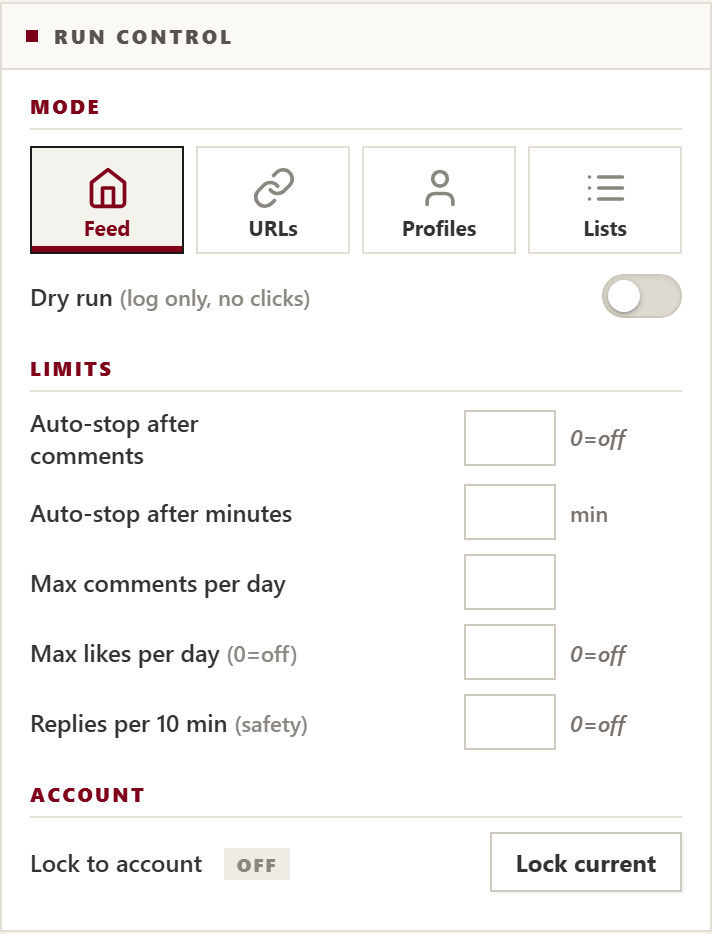
Choose Your Engagement Mode & Action Switches
actionX offers four dedicated operating modes. You control every single switch: like, intelligent comment, repost, and author follow.
How To Configure:
- Feed Walk: Browses your Home timeline naturally, reading fresh posts and building real community connections.
- URL Sniper: Paste viral tweet links to laser-target discussions with thousands of viewers.
- Profiles Mode: Engages specific target creator handles (pinned tweets or latest posts).
- Curated Lists: Laser-focus on curated X Lists without distracting algorithmic noise.
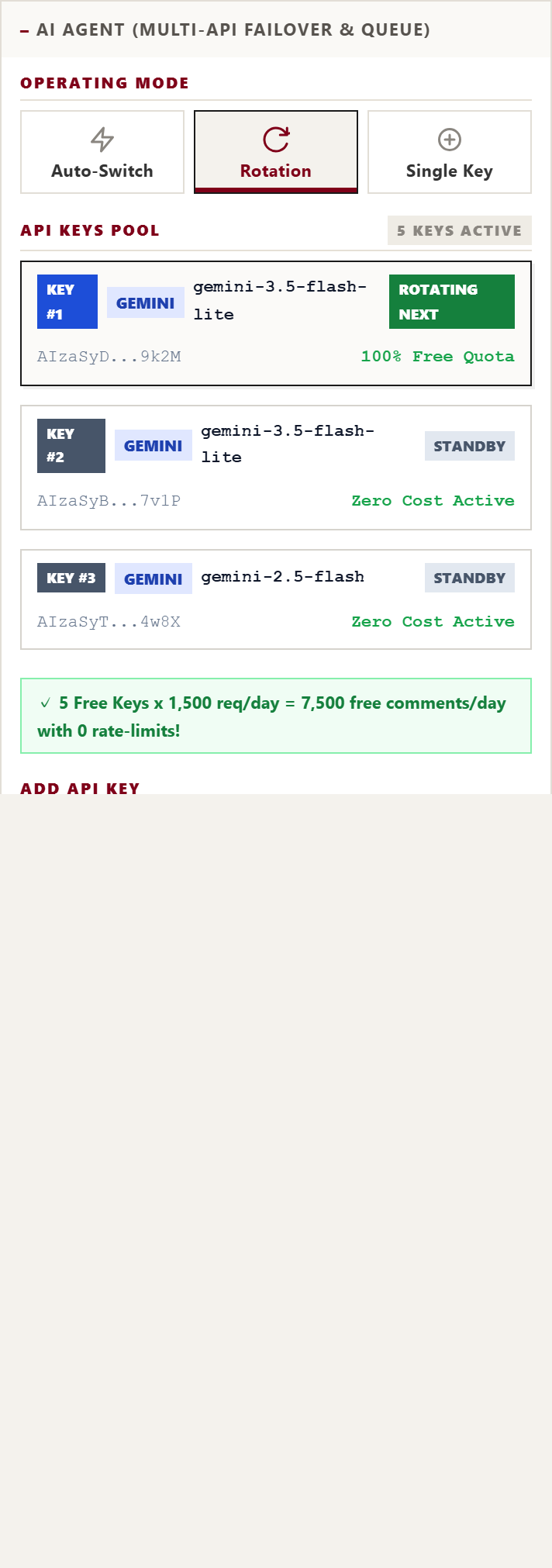
Stack 5–6 Free Gemini Keys for Zero-Cost Unlimited Replies
Stop paying expensive monthly API bills. Google provides 1,500 free requests per day per Gemini API key. By adding 5 free keys into actionX, you unlock 7,500 comments every day at 100% zero cost.
Why Multi-Key Rotation Works:
- Rotation Mode: actionX cycles through Key #1, Key #2, Key #3 for each comment, letting keys rest so you never hit rate limits.
- Auto-Switch Failover: If any single key hits a temporary quota, the engine instantly shifts to the next key without dropping a single tweet.
-
Recommended Model: Choose
gemini-3.5-flash-lite(orgemini-2.5-flash) for lightning-fast sub-second AI responses, lowest latency, and highest free quota stability.
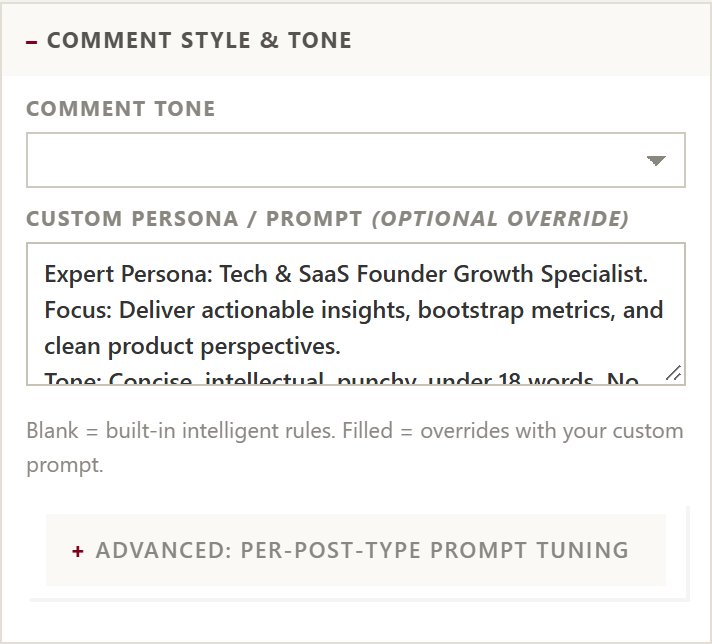
Set Your Industry Persona & Smart Blacklist Filters
Make your comments sound like an authentic domain expert, not a generic robot. actionX reads both post text and media, crafting high-context replies tailored to your niche.
Spam & Word Filter:
The built-in blacklist automatically ignores spam posts containing words like dating, dm me, telegram, whatsapp, onlyfans, pump, scam so you never waste comments on junk.
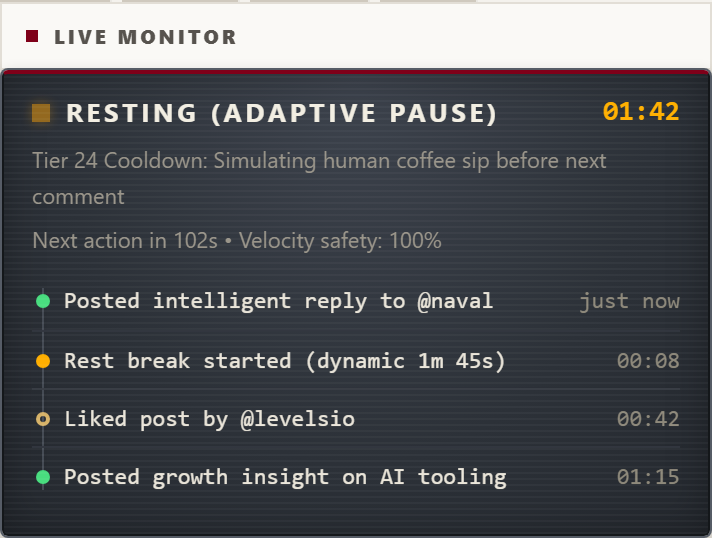
Bézier Mouse Motion & 100-Tier Adaptive Rest Engine
Platform detection algorithms look for robotic rhythm, steady speeds, and artificial click bursts. actionX completely eliminates detection flags by mimicking real human physical biology.
Safety Mechanics:
- 100-Tier Adaptive Rest Pool: Dynamic pauses automatically scale from 40s coffee sips on short runs up to deep 7–12m cooldowns for large campaigns.
-
Typo Simulation & Fix: Occasionally makes natural typing mistakes and corrects them with real backspaces (
isTrusted=true). - Live Monitor Card: View active rest states, cooldown timers, and a timestamped history of every comment and like.
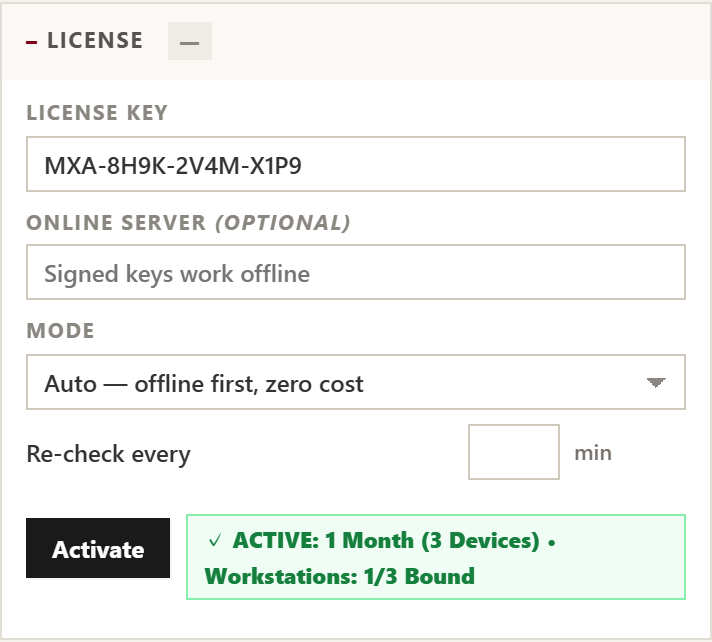
Paste License Key & Hit Start
After completing checkout on this website, you receive your instant multi-device license key. Simply expand the License panel in the extension, paste your key, and click Activate.
Ready For Autonomous Operation:
- Displays verified subscription duration and bound workstations (e.g. 1 / 3 Devices).
- Click the prominent black START button to begin autonomous engagement.
-
Use hotkeys
Ctrl+Shift+Sto emergency stop orCtrl+Shift+Pto pause at any time.
How to Install actionX on Your Computer (Step-by-Step)
Follow these simple steps with direct computer screenshots to load actionX in Google Chrome, Brave, or Microsoft Edge.
Download & Extract the Zip Package
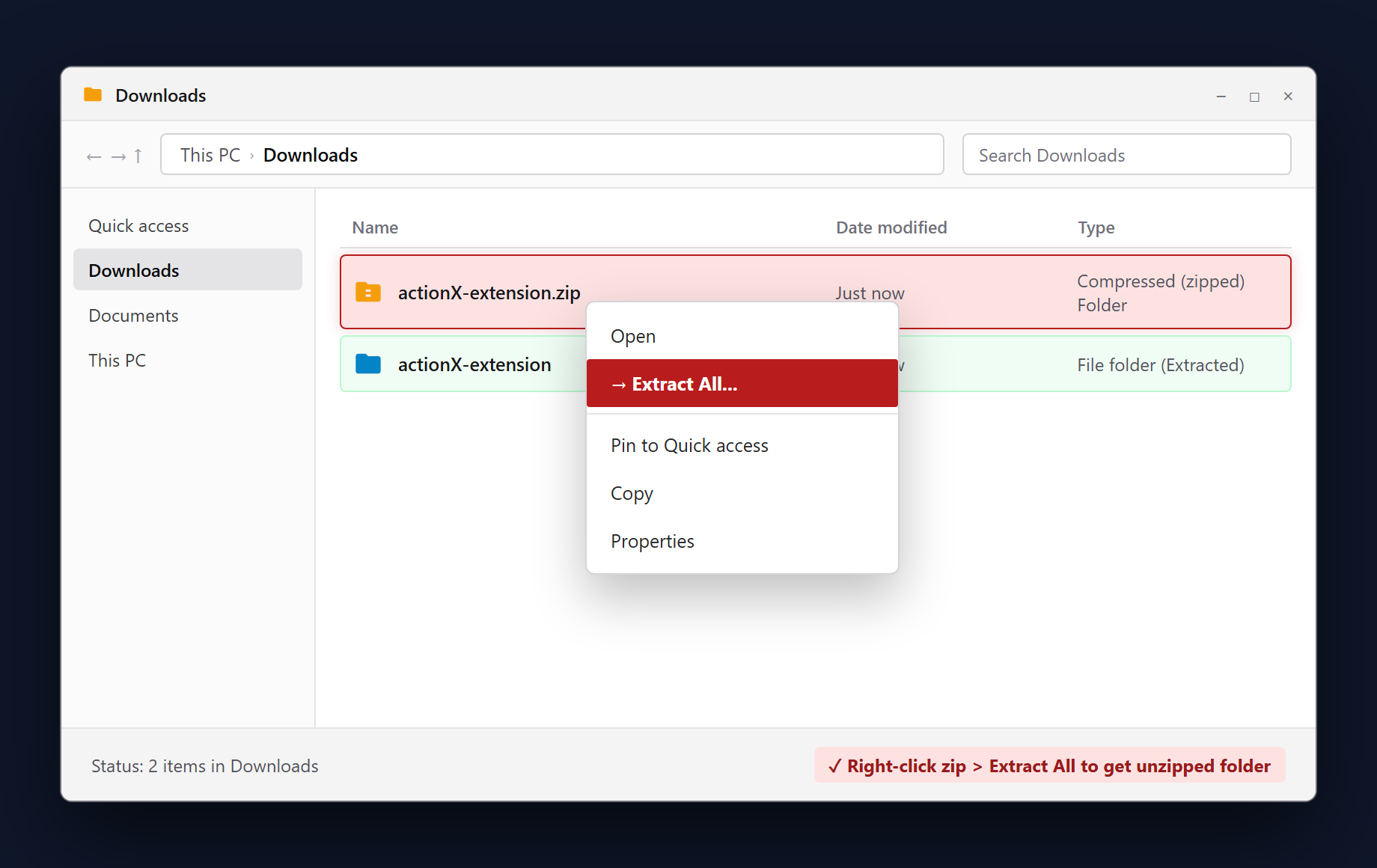
After downloading actionX-extension.zip, navigate to your Downloads folder in File Explorer. Right-click the zip archive and select Extract All... to produce the unzipped actionX-extension folder.
manifest.json. Do not select the raw compressed .zip file.
Open chrome://extensions & Turn ON Developer Mode
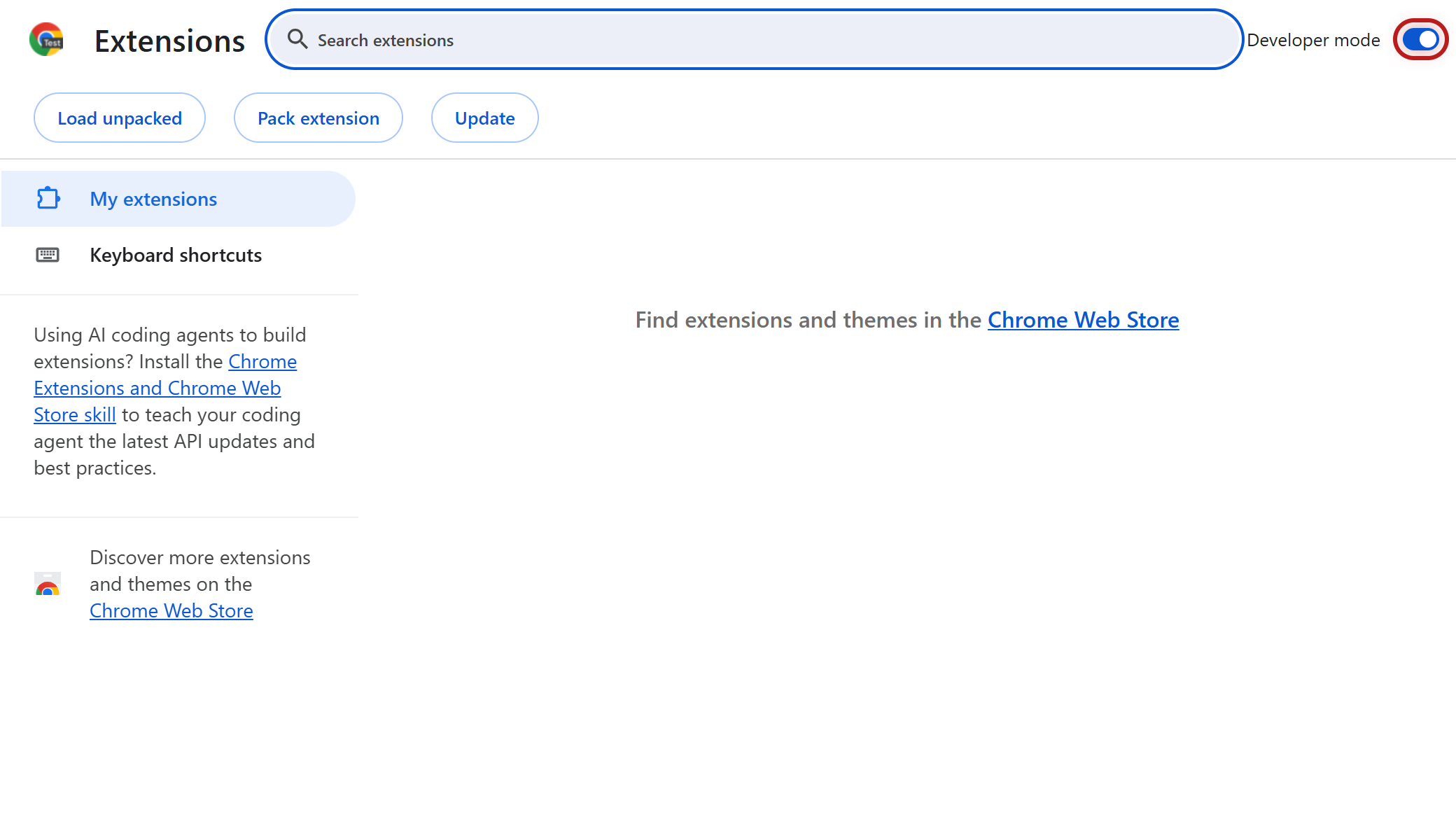
Open Google Chrome, Brave, or Edge. In the URL address bar, type chrome://extensions and hit Enter. Look at the top-right corner and toggle the Developer mode switch to ON.
Click the "Load unpacked" Button
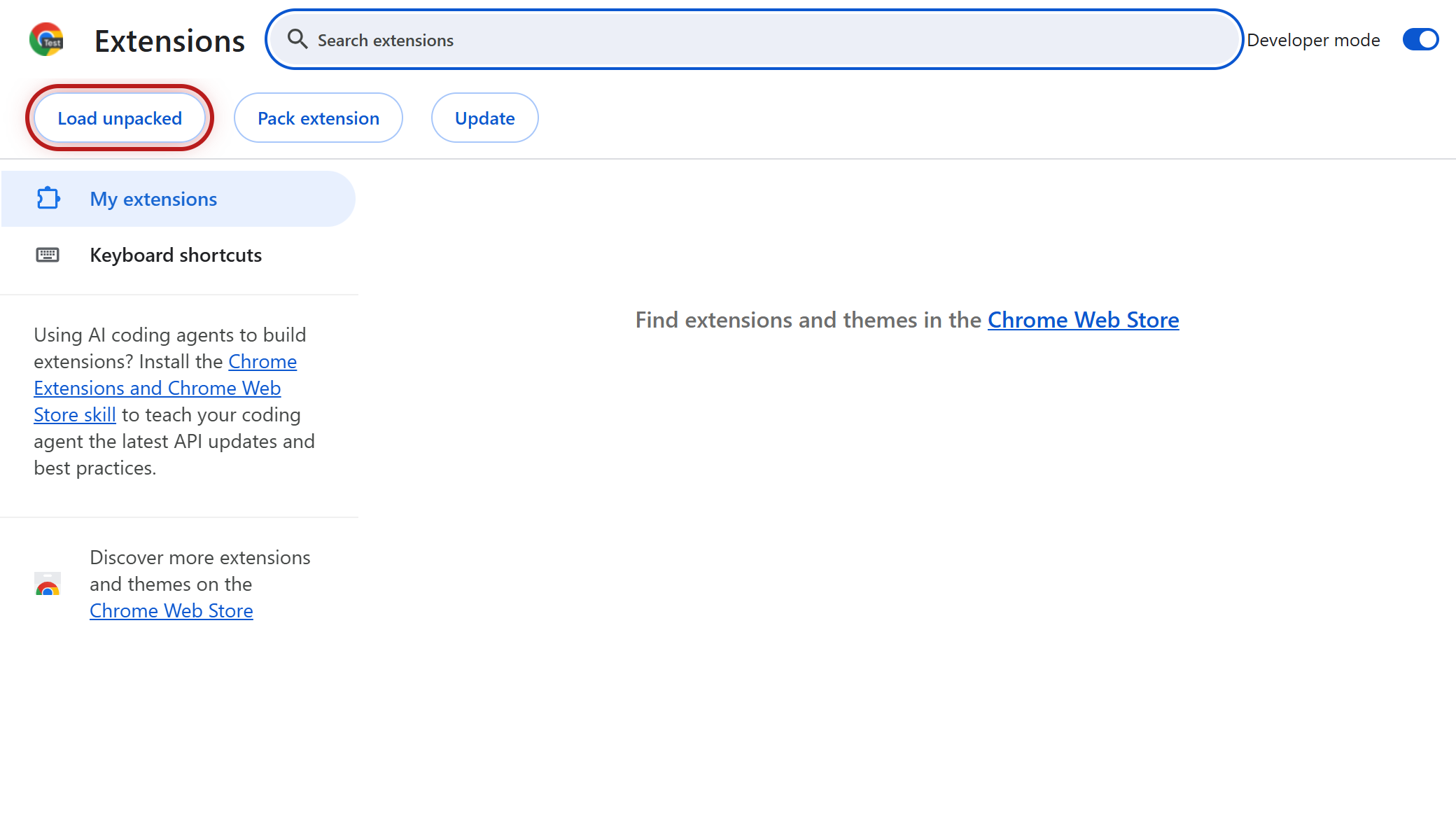
As soon as Developer mode is toggled on, Chrome displays three action buttons in the top-left toolbar. Click the button labeled Load unpacked to launch the computer folder selector.
Select the "actionX-extension" Folder
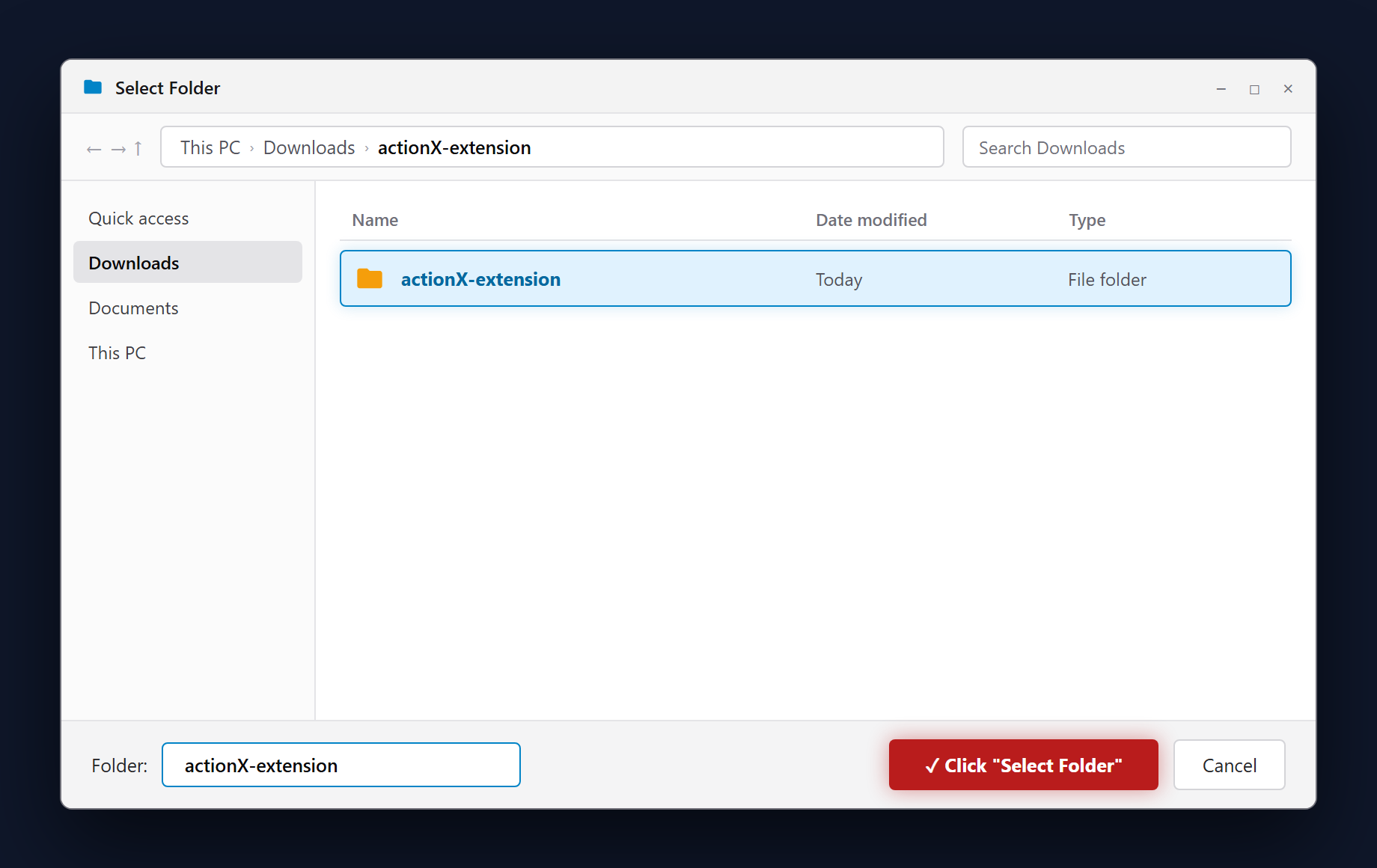
In the Select Folder window, go to your Downloads folder. Click on the unzipped actionX-extension folder (the one containing manifest.json), then click the Select Folder button at the bottom right.
Verify Extension Card is Active
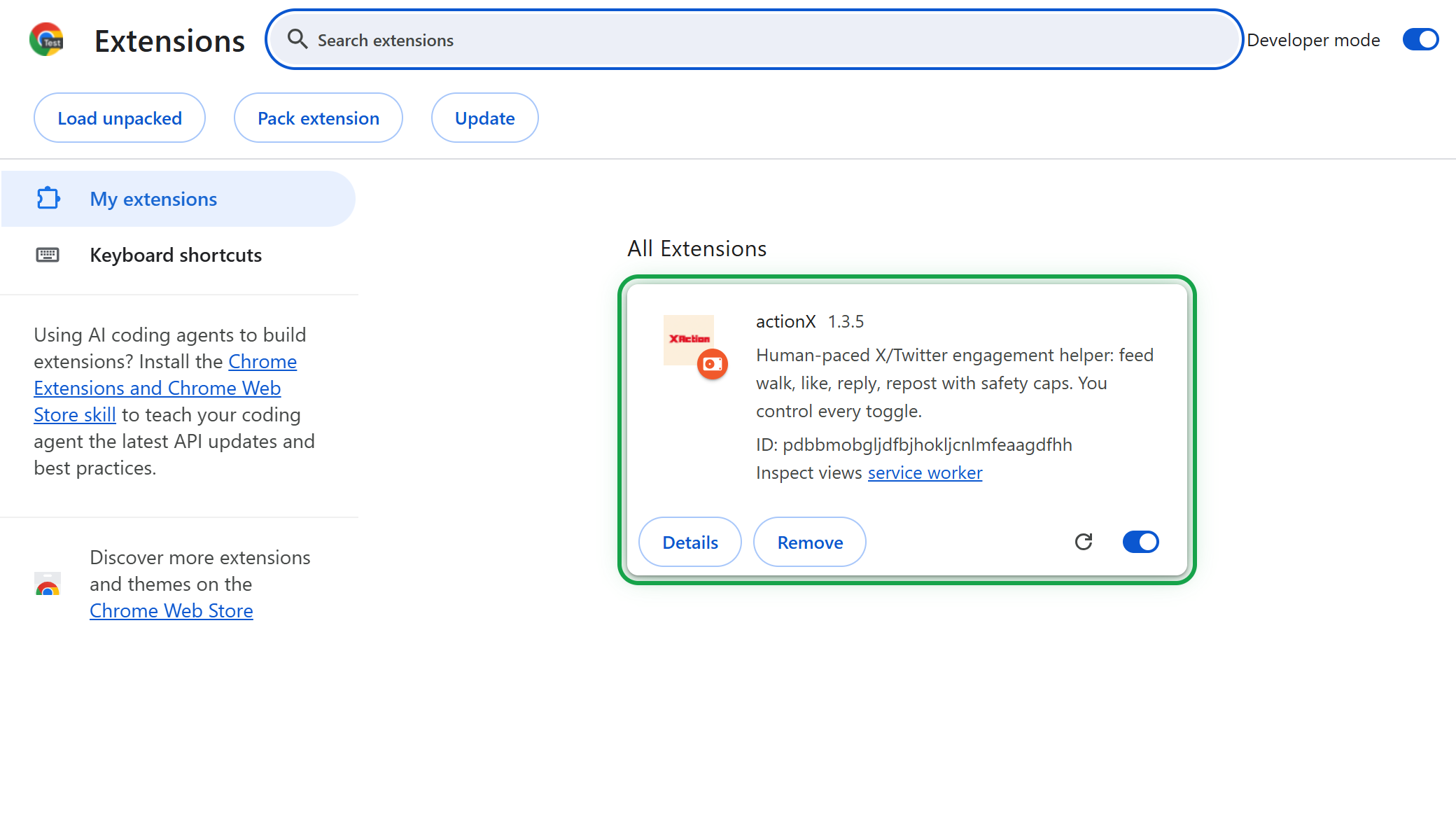
The actionX 1.3.5 card will now appear directly in your Chrome Extensions list. Verify that the bottom-right toggle switch is switched ON (blue active status).
Pin actionX to Toolbar, Paste Key & Hit START
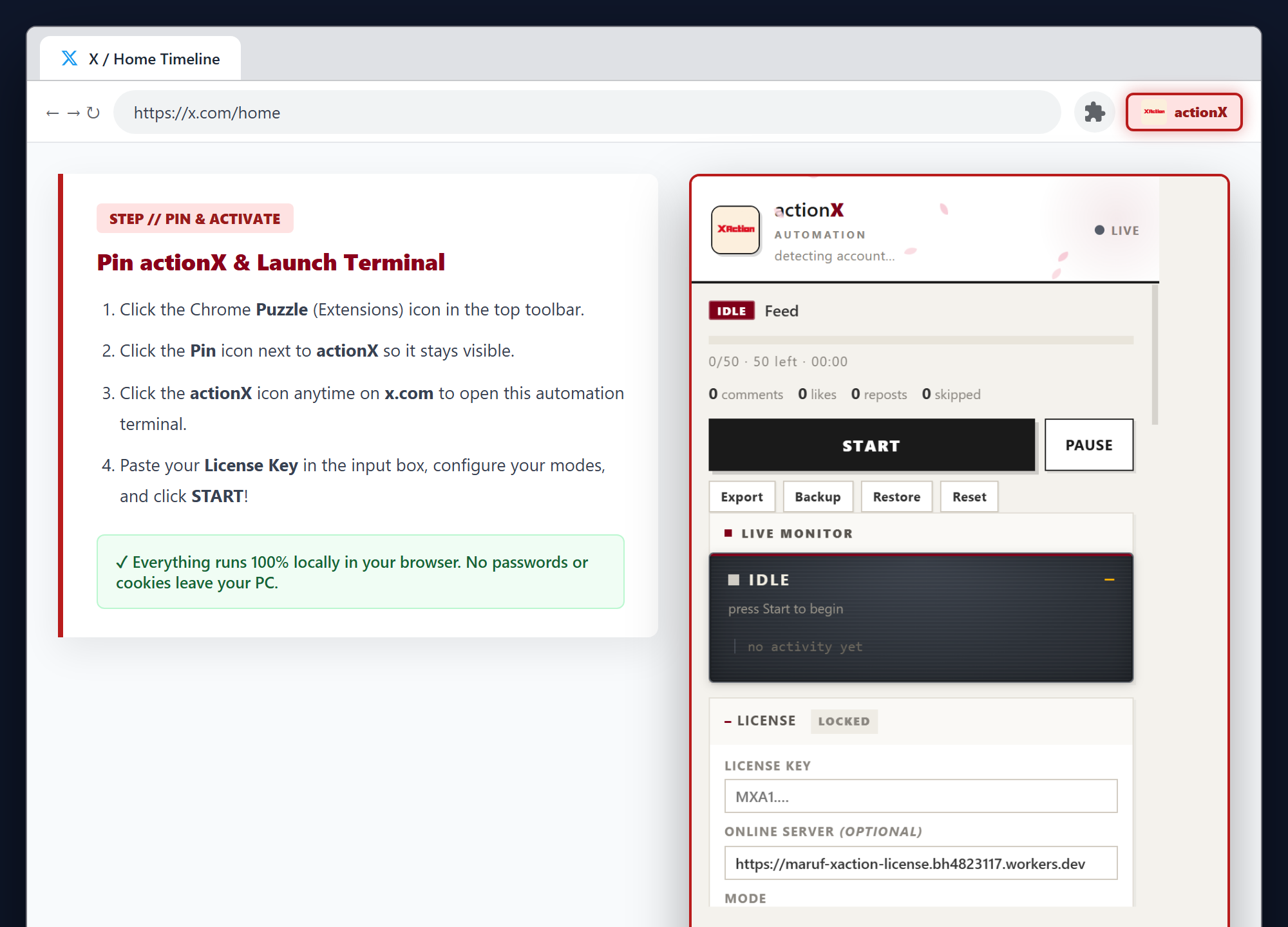
Click the Chrome Puzzle icon and click the Pin icon next to actionX. Whenever you visit x.com, click the actionX icon to open your automation terminal, paste your License Key, and click START!
Transparent Multi-Device Pricing
Get 50% off during our limited launch celebration. Choose your duration and workstation capacity below.
1 Month Access
Ideal for testing & individual growth hackers
- 1 Device License Authorization
- Multi-Key Gemini Failover & Rotation
- 100-Tier Adaptive Rest Pool Active
- Instant Key Minting & Setup Guide
3 Months Access
Quarterly farming momentum & viral growth
- 1 Device License Authorization
- 90 Days Uninterrupted Autonomous Power
- Custom Prompt Presets & Niche Brain
- Priority Customer Onboarding
6 Months Access
Semi-annual dominant community & client pipeline
- 1 Device License Authorization
- 180 Days Continuous Edge Access
- All 53 Humanized Break Rests
- Dedicated Telegram Growth Channel
1 Year (12 Months)
Maximum powerhouse for agencies & multi-account teams
- 5 Simultaneous Workstations supported
- 365 Days Unrestricted License
- Agency Device Floating & Rebind Rights
- Direct VIP Developer Telegram Access
Your Referral Activity Ledger (0)
Real-time Cloudflare KV ledger attribution| User / Masked Email | Joined Date | Status | Subscribed Plan | 10% Commission Earned |
|---|---|---|---|---|
| Please sign in with your Google account to view your referral ledger. | ||||
My Active Subscriptions & Workstations
Monitor your active license keys and device slot allocations.
Active Workstation Licenses (0)
| License Key | Plan Tier | Expires In | Device Capacity | Status | Quick Action |
|---|---|---|---|---|---|
| Please sign in to view your subscriptions. | |||||
Engineered For Elite Growth
Every line of code is structured to mirror authentic human behavioral patterns and avoid platform bot flags.
100-Tier Adaptive Rest Engine
Calculates dynamic break pauses in real-time. Automatically scales from 40s coffee rests for short runs up to 12-minute deep cooldowns for 100+ comment campaigns.
Rolling Brain Memory
Retains the last 10 posted comments across runs. Analyzes sentence structure and strictly bans repetitive openers, meta phrases, and spammy internet slang.
Zero-Downtime Multi-API Failover
Connects to Google Gemini (Free 1500 req/day per key), OpenAI, Claude, and DeepSeek. Rotates smoothly to prevent rate limits with 0 dropped comments.
Vision & Long-Article Synthesis
Captures crisp visual snapshots of infographics, graphs, and multi-page long tweets. The AI reads both image and text to craft razor-sharp takes.
Floating Multi-Device Cryptographic DRM
Cryptographically signed HMAC-SHA256 sessions supporting 1, 3, or 5 workstations simultaneously without sharing credentials.
Bézier Typing & Human Mouse Jitter
Simulates natural finger cadence with micro-pauses, typo corrections, and random human scrolling inertia so browser bot detection engines stay blind.